Lights & Electronics

Best Bike Computers of 2026

A bike computer is a small screen on your handlebar that does one job: it turns a ride into numbers you can glance at while moving. Which sounds simple until you're halfway up a climb, breathing hard, and the thing that's supposed to tell you how much further you have to go is showing you a menu instead. Screen sizes vary wildly, menus vary more, and a unit that's lovely on a coffee ride can be maddening on a windy century. The right one fixes all of that — it mounts in minutes, holds a signal under trees, and shows you the number you actually came for.

I've spent the last several months with a handlebar full of them. Over 10 months, my team and I logged real miles on 12 different computers, from bare-bones speed-and-distance units to full mapping models. Here's what first-time buyers learn the hard way: display size and readability are not the same spec — a big screen that washes out in direct sun is worse than a small one with real contrast. The picks below are the ones I kept reaching for.

1

Garmin Edge 840

Top Pick
Garmin Edge 840

All-around riding

Our Score 9.0/10
Check Price

Worth Noting

  • Premium price
Screen
2.6 inches
Battery
Up to 26 hours
Controls
Touchscreen and buttons
Navigation
Maps and courses
Read the full review

The Edge 840's most useful design decision is refusing to choose between touch and buttons. The touchscreen makes panning a map or changing a data field quick, while the physical buttons handle the same jobs when your fingers are wet or gloved. Add multi-band GNSS, 32GB of storage, ClimbPro, and daily suggested workouts, and you have a computer that can be as simple or as involved as the ride.

That flexibility is why it is our top pick. We kept coming back to the 2.6-inch screen because it is big enough for a map but not so big that it dominates a crowded cockpit, and the rated 26 hours is enough for a long day without a charger. The 2.8-ounce body disappears on the bars.

Setup is where the polish slips. The menus are deep, and the first few rides can turn into a hunt for the field you want; riders who mostly want speed and distance will pay for capability they never open. The Edge 540 is the obvious alternative if you prefer buttons and do not need touch.

The hardware still earns its keep: the touch layer and buttons coexist without feeling redundant, and the screen size hits a useful middle ground between a tiny data logger and a tablet for your bars.

Bottom line: We choose the Edge 840 when one computer has to cover mapping, training, and daily data without compromise.
2

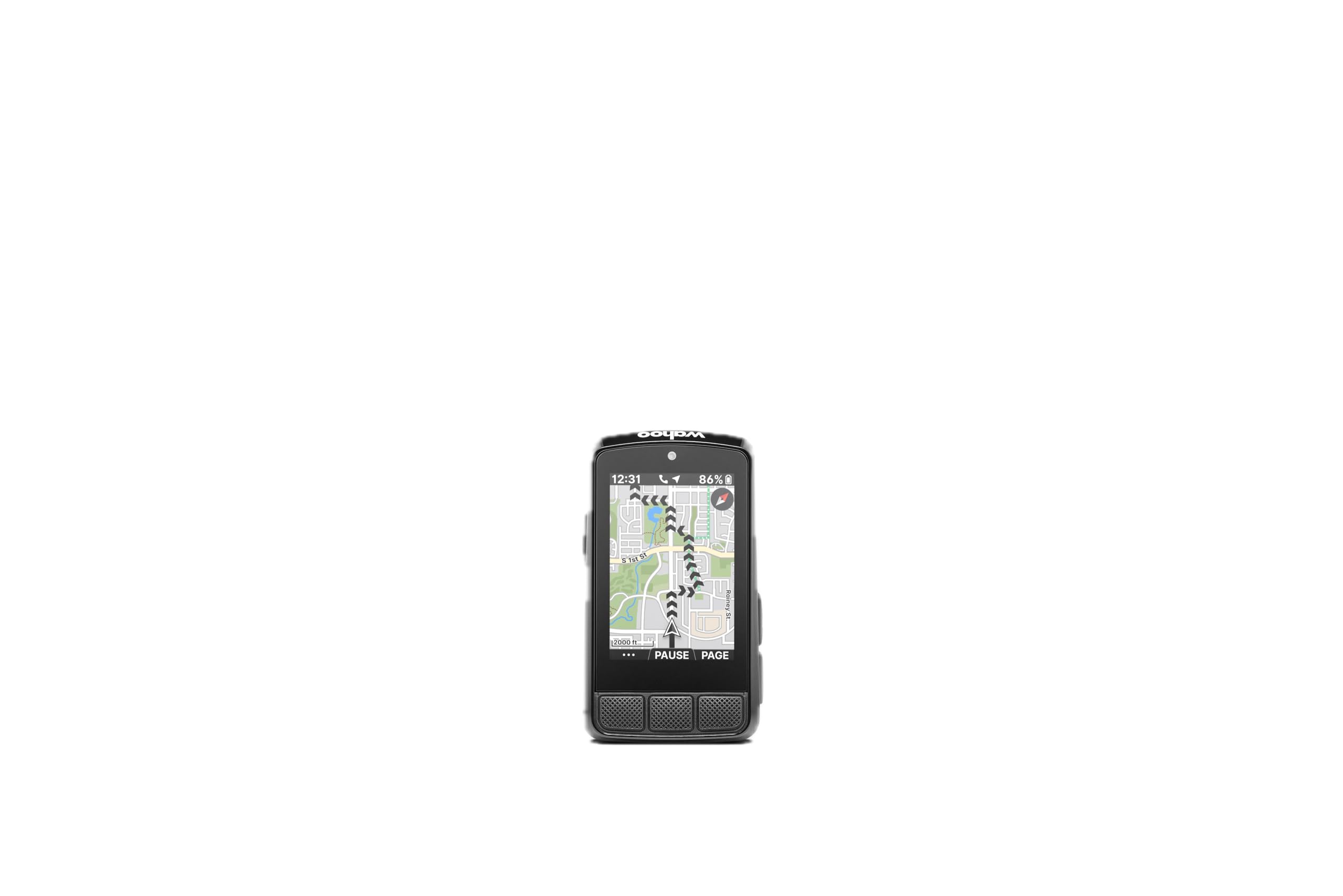
Wahoo ELEMNT Bolt V3

Wahoo ELEMNT Bolt V3

Simple navigation

Our Score 9.0/10
Check Price

Worth Noting

  • Wireless syncing can be inconsistent
Screen
2.3 inches
Weight
2.96 oz
Battery
Up to 20 hours
Navigation
Turn-by-turn
Read the full review

The Bolt V3 asks for very little handlebar space. Its 2.3-inch screen and 84-gram body leave room for a light, bell, or phone mount, and the IPX7 rating means rain is not a reason to take it off. It still packs turn-by-turn navigation, automatic route downloads, and radar integration.

The button layout is the part we appreciate most. Physical buttons give a tactile click and work through gloves, and the screen stays uncluttered because you are not poking at menus while riding. Routes arrive through the Wahoo app, so the computer is ready when you are.

That simplicity is why the Bolt is our pick for riders who follow routes but do not want a training dashboard. The 20-hour battery covers a long day, and the small screen is the compromise: maps show less detail, and four data fields can feel crowded. If you mostly need turn prompts and a few numbers, those limits are easy to live with.

Bottom line: Route-following is why the Bolt V3 makes our shortlist; its button-first design keeps navigation simple and the screen uncluttered.

3

Garmin Edge 540

Garmin Edge 540

Button-first training

Our Score 8.8/10
Check Price

Worth Noting

  • Nested menus can slow route changes
Screen
2.6 inches
Battery
Up to 26 hours
Controls
Buttons
Navigation
Maps and courses
Read the full review

The Edge 540 is the Garmin we prefer for riders who want the navigation and training core without a touchscreen. It keeps the 2.6-inch display, multi-band GNSS, ClimbPro, and daily suggested workouts from the Edge 840, and it stretches to 42 hours in battery-saver mode. What it gives up is touch and half the storage, a fair trade if your hands are usually gloved.

The buttons are the point. They move through pages reliably in rain and with winter gloves, and the 2.8-ounce body leaves room on the bars. We found the screen readable, but dense data fields can make the text feel smaller than the display size suggests. That is the cost of fitting so much on a compact unit.

For riders who follow routes and watch training load, the feature set is serious without being bloated. The 540 also avoids the touchscreen's wet-weather fussiness entirely, which is why it earns its own place rather than being a stand-in for the 840.

Bottom line: If your hands are usually gloved, the Edge 540 is the Garmin we prefer: the same maps and training tools, no touchscreen.

4

CatEye Velo 7

CatEye Velo 7

Basic ride data

Our Score 8.8/10
Check Price

Worth Noting

  • No cadence or heart-rate support
  • No backlight for low-light riding
Battery
Up to 3 years
Display
2.17 inches
Ride Data
Speed, distance, time
Connectivity
Wired
Read the full review

A three-year battery and a wire are the Velo 7's whole argument, and we find it convincing. The alkaline cell is rated to last up to three years, the sensor connects without pairing, and there is no charging routine to remember. You give up GPS and app uploads, but you get current, maximum, and average speed, trip and total distance, elapsed time, and a clock.

The 2.17-inch LCD is easy to read at a glance, and auto start/stop means the timer pauses at lights without you touching a button. At 1.12 ounces, the unit disappears on the bars. For a commuter, a kid's bike, or a second bike that does not need maps, that simplicity is the point.

Setup is mechanical rather than digital, which is both the appeal and the annoyance. The wired sensor needs clean routing along the fork, and the instructions can leave you hunting for the wheel-size step. Once it is set, the routine disappears, which is the whole point.

Bottom line: We recommend the Velo 7 to riders who want reliable speed and distance without charging, pairing, or maps.

5

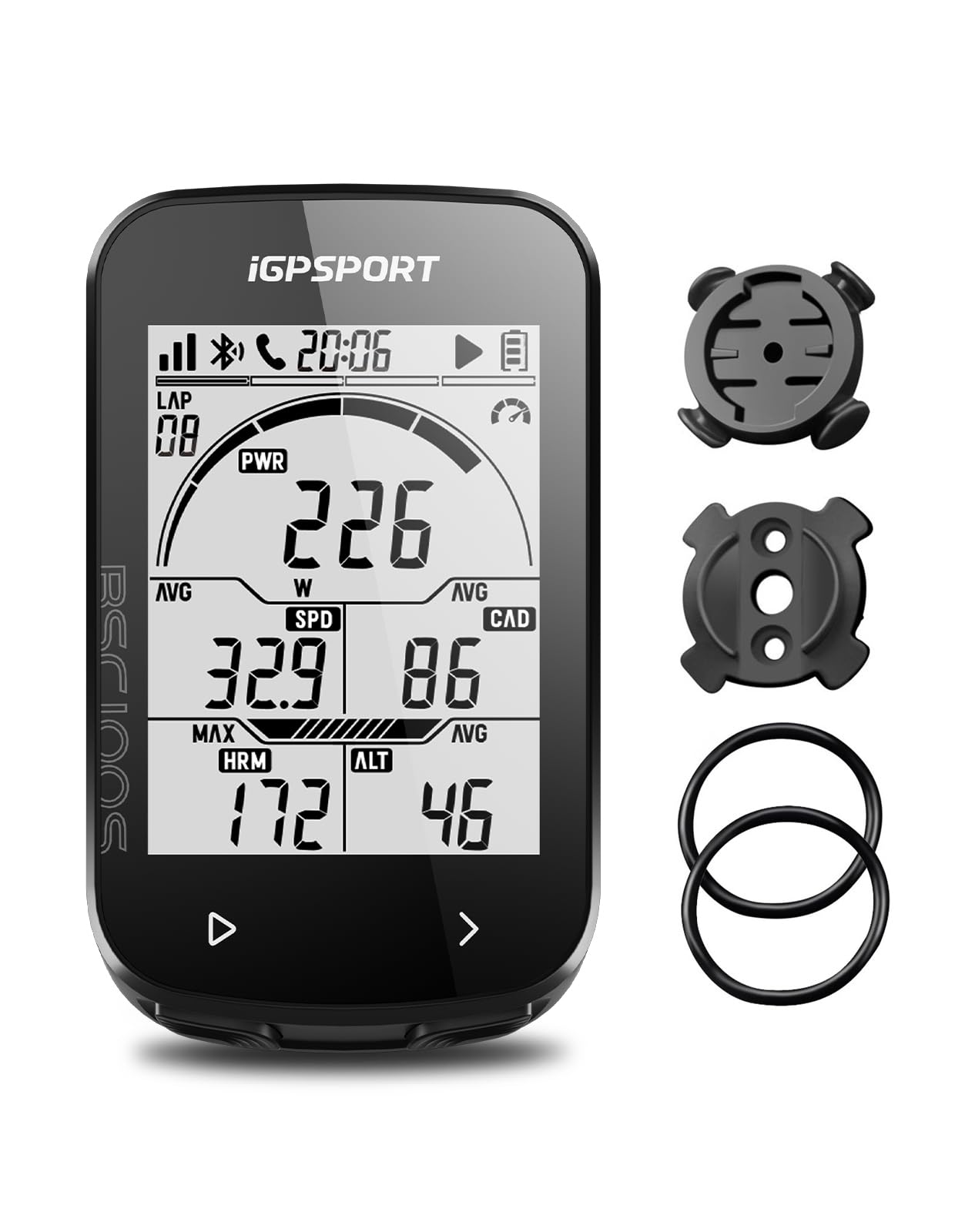
iGPSPORT BSC100S

iGPSPORT BSC100S

Budget GPS data

Our Score 8.8/10
Check Price

Worth Noting

  • No maps or turn-by-turn navigation
Screen
2.6 inches
Battery
40 hours
Connectivity
Bluetooth and ANT+
Water Resistance
IPX7
Read the full review

The BSC100S's 2.6-inch screen is the first thing that stands out. It matches the display size of our top pick, yet it belongs to a budget GPS computer, and the anti-glare LCD is designed for sunlight readability. The 40-hour battery rating means charging is not a daily ritual.

That combination is why it is our budget GPS pick. It records speed, distance, time, elevation, and more than 40 other data fields, pairs with ANT+ and Bluetooth sensors, and sends rides to Strava or Komoot through the iGPSPORT app. The payoff is a generous data screen without the premium price.

For riders who train with a cadence or heart-rate sensor, the ANT+ support is the feature that matters most. The auto backlight adjusts to changing light, and the IPX7 rating covers rain and road spray. The five-satellite positioning is there to speed up location fixes, though the initial lock can still take patience.

We found setup is the weak point. The manual is thin, pairing runs through the app, and the button menus take a few rides to learn. If you do not mind doing setup on your phone, the BSC100S rewards you with a big, readable screen and a battery that lasts.

Bottom line: Budget GPS computers usually make you squint; we appreciate that the BSC100S gives you a 2.6-inch screen and sensor support.

6

CooSpo BC107

CooSpo BC107

Long ride battery

Our Score 8.6/10
Check Price

Worth Noting

  • Setup and app can be fiddly
Screen
5.84 centimeters
Battery
80 hours
Connectivity
ANT+ and Bluetooth
Water Resistance
IP67
Read the full review

The CooSpo BC107's 80-hour battery rating is the number that matters. On a commuting schedule or a multi-day tour, it changes how you pack: the charger becomes an occasional item rather than a daily one. The screen and IP67 body keep the unit useful in rain, and GPS tracking means no wheel sensor or magnet.

ANT+ support is the other reason to look at it. The BC107 pairs with heart-rate, speed, cadence, and power sensors, and the Bluetooth app handles setup and Strava uploads. The screen shows the numbers clearly, though it cannot display current and average speed at the same time, which is an odd limitation for riders who pace by both.

We keep the BC107 in the roundup because it covers the long-battery, sensor-friendly role that the basic computers cannot. It is not a navigator: the screen is for data, not maps, so route-following stays on your phone or a mapping unit. For commuting, training by feel, or logging a tour, that trade-off is sensible.

Bottom line: We keep the CooSpo BC107 here because its rated 80 hours suits riders who add a heart-rate or cadence sensor.

7

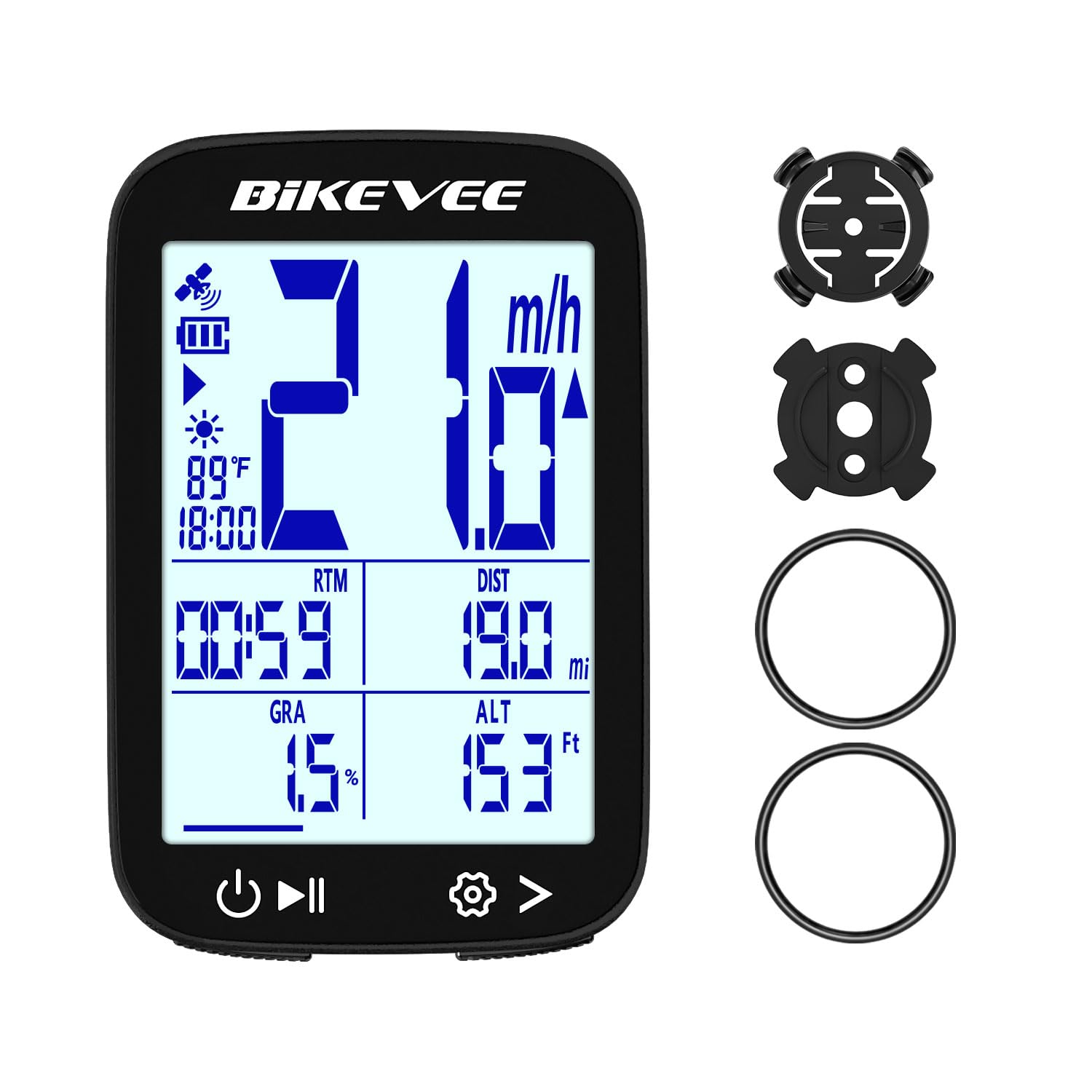
Bikevee GPS Bike Computer

Bikevee GPS Bike Computer

Climbing data

Our Score 8.6/10
Check Price

Worth Noting

  • Rubber-ring mount can shift on rough surfaces
  • No maps or turn-by-turn navigation
Screen
2.4 inches
Battery
28 hours
Elevation Data
Altitude, gradient, ascent
Water Resistance
IPX7
Read the full review

Altitude, gradient, and accumulated ascent are usually the first features to disappear as the price drops. The Bikevee keeps them, along with temperature, on a 2.4-inch screen. It gets speed and distance from GPS, so there is no wheel sensor or magnet to install.

The barometric altimeter is the reason to choose it over a basic GPS logger. Riders who care about climbing can see gradient and ascent while they ride, and the 28-hour battery covers long days. At 50 grams, the unit barely changes the cockpit, and IPX7 protection covers wet weather.

The start is the weak point: satellite acquisition can take a minute, so turn it on before you roll out. Once it has a fix, the display is easy to scan and the buttons are simple to cycle through.

We keep the Bikevee in the roundup because it gives budget-minded riders climbing data that usually disappears at this end. For hilly training loops and everyday rides, the trade-offs are easy to accept.

Bottom line: Altitude and gradient data usually vanish at the budget end, so we value that the Bikevee keeps both on a sensible 2.4-inch screen.

How We Tested a Dozen Bike Computers

We started by pulling together every computer a real rider might buy — budget units that only track speed and distance, mid-range GPS head units, and mapping models — then cut the list by screen size, sensor support, battery claims, and price so we weren't riding four versions of the same thing. That left 12 units, which we tested over 10 months. Setup happened on the kitchen counter first: I timed each one from box to first recorded ride and noted every time I had to open the manual. A few never got opened. Several did, repeatedly.

Then we rode. Each unit spent a week on the same handlebar before moving between a road bike, a gravel bike, and a flat-bar commuter, so mounting hardware got as much scrutiny as the software — out-front mounts, zip ties, quarter-turn adapters, and whether I could pull the thing off one-handed at a red light. I paired the same speed, cadence, and heart-rate sensors to every computer and ran a 20-mile loop with two units at once, comparing distance, elevation, and average speed side by side. We routed through dense tree cover and between downtown buildings on purpose to see which ones lost the signal and which just logged a slightly wrong line.

Screen testing was its own project: I checked each display at noon in direct sun, at dusk, and from the drops, and counted how many taps it took to change a data field mid-ride. A large screen with poor contrast lost to a small one every time. Battery life got measured on long rides rather than on paper, and we watched for the small reliability failures — rides that wouldn't sync to the phone, sensors that needed re-pairing, units that fogged in rain. Value came last: after living with all 12, we asked which ones still felt worth the handlebar space once the novelty wore off.

How to Choose Bike Computers

Decide Between Data, GPS, and Maps

A bike computer does not have to navigate. The CatEye Velo 7 is the simplest version of the idea: a wired sensor, a 2.17-inch screen, and speed, distance, and time without a charger or an app. GPS units such as the iGPSPORT BSC100S and CooSpo BC107 add location-based speed, distance, and ride files, but their screens still show numbers rather than maps. The Garmin and Wahoo picks add route guidance.

We treat mapping as separate from GPS. A product can say GPS and still be a data logger; if you want turn-by-turn, check for maps, course support, and rerouting. Riders who repeat the same routes and only want stats can skip that capability and spend less.

Match the Screen and Controls to Your Riding

Screen size is a cockpit decision as much as a readability one. A 2.6-inch display like the Edge 840 or BSC100S fits a useful map or several data fields without crowding the bars. The smaller 2.3- and 2.4-inch screens are easier to fit but show less at once, which matters when you are following a route or watching several numbers.

Controls matter just as much. Touchscreens are quick for panning and menus, but they can be fussy with wet gloves; physical buttons are slower but dependable. The Edge 840 gives you both, the Edge 540 uses buttons only, and the Bolt relies on a tactile button layout. Choose the control style you will use on your worst-weather ride, not the one that looks best in the shop.

Plan Around Battery Life

Battery ratings are only useful against your longest ride between charges. The Garmin and Wahoo units here are rated around 20 to 26 hours, enough for a long day and then some; the budget GPS units stretch from 28 to 80 hours, while the wired Velo 7 runs on an alkaline battery rated for up to three years.

Look at how the maker reaches the big number. Battery-saver modes can dim the screen or limit mapping, and cold weather cuts run time. We prefer a clearly rated 20-hour battery with full features to a longer claim that only holds with the screen off. For multi-day rides, check the charging port and carry a small battery pack.

Check Connectivity and Sensor Support

If you train with a heart-rate strap, cadence sensor, or power meter, compatibility is the feature that keeps the computer useful. The CooSpo and iGPSPORT list ANT+ support; the Garmin and Wahoo units pair with sensors and phones through their own systems, so confirm the specific accessory before you buy. The CatEye Velo 7 is speed and distance only.

Phone sync matters for getting rides into Strava, but it is not the same as sensor support. Budget units often rely on an app for setup and uploads, and their manuals can be thin; allow time to pair and update before your first ride. Wired sensors avoid pairing altogether, which is why the Velo 7 remains appealing for a simple bike.

Mount It Securely and Leave Room

A computer is only useful if it stays put. Out-front mounts keep the screen ahead of the stem, but a crowded cockpit may not have room; stem mounts are shorter, and rubber-ring mounts are common on budget units. The Wahoo Bolt and Garmin Edge models include out-front or standard mounts, while the Bikevee uses rubber rings.

Check bar diameter and clearance before ordering, especially with a light, bell, or phone mount already fitted. Use the supplied tether where there is one, and recheck the mount after rough pavement. We treat a wobbly mount as a dealbreaker, not an accessory problem.

Frequently Asked Questions

Final Verdict

Our default remains the Garmin Edge 840: it is the one computer here that makes maps, training metrics, and glove-friendly controls feel like one system rather than a pile of features. The alternative is the Garmin Edge 540 if you ride in gloves, rarely pan a map, and prefer buttons; it keeps the navigation and training core for less money. If maps are not part of your riding, the CatEye Velo 7 handles speed and distance with almost no upkeep, while the iGPSPORT BSC100S is the budget choice for GPS data.